Spec-Driven Development with Spec Kit
Updates
- 20261029: Add paragraph about bug fixing with
/speckit.bug.*commands (see Bug fixing).
Introduction
I have an old internal Python Flask app where I store website links. It’s a web application for bookmarks. It’s pretty simple and also quite dated 😉 It only allows me to add a URL, a description, and some tags. It also takes a screenshot of the website. And then you can display those links (newest first) and search by tags. That’s pretty much it. The URL, description, and tags are stored in an also pretty dated MongoDB. So it’s time to replace it with something more recent.
Before you ask: yes, I know there is Linkwarden. But I have something in my head which is very opinionated 😄
My new bookmark application will be called la-memoria. Since I’m starting from the greenfield, I don’t need to take care of anything that already exists. This makes things much easier. After I have a somewhat usable version of the web app, I also want to import the links and screenshots from my current Flask app. This will most probably be just an importer script in the end.
In December 2025, I started vdradmin-go. It’s a web frontend for VDR (Video Disk Recorder), a digital satellite receiver. It was mainly based on vdradmin-am, which was written in Perl. vdradmin-go was mainly vibe-coded first. But over time, I added an AGENTS.md, which caused the AI to write more docs over time. That helped a lot in getting better results and also made the AI adhere to certain standards. Meanwhile, it also has quite a few tests (still no frontend tests with Playwright). I started with GPT-5.2 and currently I’m mainly using GPT-5.6 Terra, and for simple tasks, GPT-5.6 Luna.
For la-memoria, I wanted to try something different by using GitHub’s Spec Kit and Spec-Driven Development (SDD). According to the docs, SDD is:
Spec-Driven Development flips the script on traditional software development. For decades, code has been king - specifications were just scaffolding we built and discarded once the "real work" of coding began. Spec-Driven Development changes this: specifications become executable, directly generating working implementations rather than just guiding them.Just to mention it: there is not only GitHub’s Spec Kit, but also a more lightweight implementation like OpenSpec.
If you have a lot of money, various AI models could use the same specs and implement them (but as you’ll see later, you still need some money anyway). And then you can take what you think fits best 😉. But I don’t have that much money. I’m using GPT-5.6 Terra a lot recently, and I’ll stick with it for this project too (at least for implementing the code).
My initial idea why SDD might be the right tool
As mentioned above, I started vdradmin-go mainly by doing vibe-coding. But the AI output got way better after I added AGENTS.md. This file includes one topic, Self-Improvement Loop. It states that the agent should:
- After ANY correction from the user: update
DOCS/LESSONS.mdwith the pattern. - Write rules for yourself that prevent the same mistake.
Or later in that doc:
- Plan First: write a plan to
docs/TODO.mdwith checkable items. - Document Results: add a review section to
tasks/todo.md. - Capture Lessons: update
docs/LESSONS.mdafter corrections.
That really helped. The better the docs got over time, the better the code was, and the agents were able to implement a new feature basically in one go.
In the README.md, I also set some goals right from the start, for example:
- Modern Architecture: hexagonal (ports & adapters) architecture for maintainability
- Clean Code: following Go best practices and SOLID principles
That alone already makes the code more readable and, especially, more maintainable and testable.
But AGENTS.md wasn’t there right from the start, for example. So I came across SDD and Spec Kit from GitHub. It really sounded like a good idea because everything I did above as an afterthought is something SDD basically forces you to do right from the start (or generates it for you). That sounded like the right approach to me after the experiences I made with vdradmin-go.
BTW: Spec Kit just turned one year old and shipped 1.0.0.
Development environment
My development IDE is Visual Studio Code (but Spec Kit supports a lot of other IDEs), and I have the following extensions installed (among others):
- YAML Language Support by Red Hat: For configuration files, I normally use YAML.
- Icons for Visual Studio Code: For a better look 😉
- VIM for Visual Studio Code (can’t type without it 😄)
- Visual Studio Code Remote Development: This is very handy if you want to edit files on a remote machine via SSH or use a remote machine as a development environment, for example.
- Visual Studio Code extension for Prettier: Prettier is an opinionated code formatter. It enforces a consistent style by parsing your code and re-printing it according to its own rules, taking maximum line length into account and wrapping code when necessary.
- markdownlint: Markdown/CommonMark linting and style checking for Visual Studio Code.
- Markdown Support for Visual Studio Code: All you need for Markdown (keyboard shortcuts, table of contents, auto preview, and more).
- VS Code Makefile Tools
- Visual Studio Code CSS Intellisense for HTML
- Go for Visual Studio Code
- GitHub Actions for VS Code: The GitHub Actions extension lets you manage your workflows, view the workflow run history, and helps with authoring workflows.
- Visual Studio Code Dev Containers: Open any folder in WSL, in a Docker container, or on a remote machine using SSH and take advantage of VS Code’s full feature set.
GitHub Copilot subscription
I started with a GitHub Pro account at that time and used it until a few weeks ago. Recently, I upgraded to GitHub Pro Plus because I’m doing more coding lately with AI. The nice thing about GitHub Pro/Pro Plus is that you can use a lot of different models (e.g. from Anthropic, OpenAI, Kimi K3, Gemini Flash, …) and choose the one that fits best for you. Some more advanced models are only available for Pro Plus and higher subscriptions. At the moment, I’m mostly using GPT-5.6 Terra or GPT-5.6 Luna for easy tasks. Even more models are available via OpenRouter, e.g. the latest AI models from China like Kimi, GLM, or MiniMax. I haven’t tried them yet, especially not with VS Code.
Installing uv
uv is a fast Python package manager by Astral. Spec Kit uses uv (via uvx or uv tool install) to run the specify CLI without polluting your global Python environment.
Check with uv --version if it’s already installed. If not, please check Installing uv. For Arch Linux, it’s just sudo pacman -S uv, for example.
Install Spec Kit
It’s as simple as this after uv is installed:
uv tool install specify-cli --from git+https://github.com/github/spec-kit.git@vX.Y.ZCurrent version is 1.0.8 as of writing this blog post. So replace vX.Y.Z with v1.0.8 (keep the v!). Afterward you have a new specify command. E.g. in my case:
which specify
$HOME/.local/bin/specify
Install LLM Wiki a Spec Kit extension
This is optional of course. From the docs: LLM Wiki - a Spec Kit extension an LLM-maintained, compounding project wiki for spec-driven development: source ingestion with per-claim citations, questions answered from the wiki (never from vibes), and a lint pass that keeps the knowledge base honest.
There are several extensions available for Spec Kit. LLM Wiki implements Karpathy’s LLM Wiki pattern. So I thought this might be a good idea to have such an extension that also maintains such a wiki.
To install it (as said it’s totally optional):
specify extension add wiki --from https://github.com/formin/spec-kit-wiki/archive/refs/tags/v1.0.0.zipThe outcome of what comes next
Version/tag 0.0.1 of la-memoria contains what the outcome was of all the topics that come next. If you’re interested open the Github link and look around.
Initialize a project
As mentioned above, my application will be called la-memoria. I created a GitHub repository first and then cloned it locally with git clone git@github.com:githubixx/la-memoria.git (you can also use the GitHub CLI utility, like gh repo clone githubixx/la-memoria). This creates a directory named la-memoria, which already contains a few files like README.md.
Let’s enter this directory.
cd la-memoriaSince it is non-empty, I need to use --force to initialize a project with the specify command:
specify init --here --force --integration copilot--here initializes everything in the current directory. --integration copilot sets up everything for GitHub Copilot (and VS Code with Copilot integration). Spec Kit supports a lot of other integrations as mentioned above. If you just use specify init --here --force, it will ask you to choose one (for further information, see Initialize a project). It will also ask which shell to use. In my case it’s sh because I’m on Linux.
Upgrading Spec Kit can be done like this:
specify self upgradeOr with --dry-run to see what would happen. For uv tool installs, it runs uv tool install specify-cli --force --from <git ref> under the hood so pinned release tags work, including dev, alpha/beta/rc, or build metadata suffixes.
Starting VS Code
While still in the la-memoria directory, I start VS Code with code .. If Spec Kit was installed successfully, you should now be able to enter /speckit in the Chat window on the right-hand side, and it will show you quite a lot of different /speckit commands, like /speckit.constitution, for example.
speckit.constitution
/speckit.constitution is actually the very first command one uses to start a new project. Normally this only needs to be done once, but it can be adjusted if needed (actually, I needed to adjust it two times because my initial version was too strict when it came to secret handling). What is defined in .specify/memory/constitution.md is the law. The agents won’t implement a feature if it violates what is written there.
The constitution defines non-functional requirements. One does not specify here what one wants to build or which frameworks to use, for example. I will reuse a small set of items for the constitution that I used in my goals for vdradmin-go.
So let’s start. In the chat window, I entered the following text to begin creating the constitution:
/speckit.constitution Every feature begins as a standalone library. No
feature is implemented directly in application code without a clear
justification recorded in the complexity tracking section of its plan.

Apply Hexagonal's ports/adapters inside each library and Clean's
use-case layer to orchestrate them.

Prefer vanilla HTML, CSS and JS for code that runs in the browser.

Every library exposes its functionality through a CLI using stdin/stdout
protocols, enabling composability and scriptability.

TDD is mandatory. Tests must be written, reviewed, and confirmed failing
before any implementation code is written. Red-Green-Refactor is strictly
enforced.

Integration tests are required for: new library contract tests, contract
changes, inter-service communication, and shared schema changes.

All services must emit structured logs. Text I/O must ensure debuggability.
Frontend logs must be unified with backend logs where applicable.

Start simple (YAGNI). Avoid unnecessary patterns (Repository, UnitOfWork,
etc.) unless proven necessary. Justify any added complexity explicitly.

Semantic versioning required for all libraries. Breaking changes require
MAJOR version bump and migration guide.

Prefer boring technology. Avoid vendor lock-in. All secrets via environment
variables.
I think the intention here is clear. The first paragraph basically states that features should be in a library if it makes sense and not be part of the app itself, for example. In general, this helps with testability, usability, and separation of concerns. In addition, using hexagonal architecture (aka the Ports & Adapters pattern) makes it easy to extend the app later or replace a component (e.g. replacing PostgreSQL with MySQL). For a small program, this is of course overkill. But since I don’t yet know where my app will head, and it also won’t be only a few lines of code, it makes sense.
About Prefer vanilla HTML, CSS and JS for code that runs in the browser, I’m not 100% sure if it should be here or if it’s more of a technical requirement (which comes later). But using a complicated framework needs justification nowadays, in my opinion. That’s why I kept it here.
TDD and Red-Green-Refactor make a lot of sense for agents. This way, they need to prove that the code works. But honestly, while working on this project, I also discovered that there are side effects that even this approach does not cover.
Refactoring with the help of agents also becomes cheap. So YAGNI (You Aren’t Gonna Need It) makes sense. Build for today’s requirements, and refactor when tomorrow’s actually arrive.
I think the rest of the constitution should be clear.
Executing the command above will generate .specify/memory/constitution.md (as mentioned already), which will look a bit different than what you provided above. But the constitution text you provided will be processed by an AI model and rewritten to be consumed later. In my case, the constitution.md looks like this (this is version 1.0.0 - I ended up with version 3.0.0 because I needed a few adjustments, which I only discovered later):
<!--
Sync Impact Report
- Version change: template -> 1.0.0
- Modified principles: none (initial adoption)
- Added sections: Architecture and Technology Constraints; Development Workflow and Quality Gates
- Removed sections: none
- Follow-up TODOs: none
-->
# la-memoria Constitution

## Core Principles

### I. Library-First Architecture

Every feature MUST begin as a standalone library with a clear, independently testable purpose. Application code MUST NOT implement feature behavior directly unless its plan's Complexity Tracking section records a specific justification. Each library MUST apply Hexagonal Architecture using ports and adapters, with a Clean Architecture use-case layer that orchestrates those adapters. This keeps feature logic reusable, testable, and independent of delivery mechanisms.

### II. Composable Command-Line Interfaces

Every library MUST expose its functionality through a CLI that uses defined stdin/stdout protocols. CLIs MUST preserve machine-composable output on stdout and send diagnostics and errors to stderr. Their text I/O contracts MUST be documented and debuggable so libraries can be reliably combined in scripts and automation.

### III. Test-First Delivery

Test-driven development is mandatory. Before implementation code is written, tests MUST be written, reviewed, and confirmed failing. Changes MUST follow the Red-Green-Refactor cycle, with the smallest implementation needed to make the approved failing test pass before refactoring. This produces executable requirements and prevents unverified behavior from entering the system.

### IV. Contract and Integration Verification

Integration tests are REQUIRED for new library contracts, contract changes, inter-service communication, and shared schema changes. Such tests MUST exercise the real boundary contract rather than only mocks. They protect compatibility where isolated unit tests cannot establish it.

### V. Observable, Simple, and Compatible Systems

All services MUST emit structured logs. Text I/O MUST retain sufficient diagnostic context, and frontend logs MUST be unified with backend logs when those components participate in the same workflow. Implementations MUST begin with the simplest solution that meets current requirements; patterns such as Repository and UnitOfWork MUST NOT be introduced without an explicit necessity and a recorded complexity justification. Libraries MUST use semantic versioning, and every breaking change MUST receive a MAJOR version bump and a migration guide.

## Architecture and Technology Constraints

Browser-executed code MUST prefer vanilla HTML, CSS, and JavaScript unless a documented requirement demonstrates that another technology is necessary. Projects MUST prefer established, portable, well-understood technologies and MUST avoid vendor lock-in where a practical portable alternative exists. Secrets MUST be provided through environment variables and MUST NOT be committed, embedded in source, or logged.

## Development Workflow and Quality Gates

Every feature plan MUST identify its library boundary, ports, adapters, use cases, CLI protocol, test strategy, logging behavior, versioning impact, and any required integration tests. Plans MUST include a Complexity Tracking section. Any exception to library-first implementation or any added architectural pattern MUST state the problem, alternatives considered, and why the added complexity is necessary. Reviewers MUST verify that failing tests preceded implementation and that required integration tests, structured logging, semantic-versioning decisions, and migration guides represent before approval.

## Governance

This constitution supersedes conflicting development practices. Amendments MUST document the affected principles, rationale, migration impact, and semantic version bump. A MAJOR version increments for incompatible governance removals or redefinitions, a MINOR version increments for new principles or materially expanded requirements, and a PATCH version increments for clarifying or non-semantic changes. Each plan, implementation review, and release review MUST assess compliance; unresolved exceptions require a documented Complexity Tracking entry and explicit approval before work proceeds.

**Version**: 1.0.0 | **Ratified**: 2026-08-06 | **Last Amended**: 2026-08-06
This will be part of the context that gets sent to the AI model. In general, you can expect that SDD will burn a lot more tokens than if you just use the “plan” mode in Copilot or Claude Code and then start the implementation, for example. The constitution.md alone is already quite a bit of text that always needs to be sent to the AI model with every request. So try to keep it at a manageable size. But I’d expect that most AI providers do some context caching. That should reduce the problem of burning tokens a bit.
speckit.specify
Next, /speckit.specify comes into play. It’s for functional specification. Here you specify what you want to build but not how. Try to be as specific as possible and add as many details as you can to avoid making the model guess (though assumptions can be clarified later). Also don’t add any technical details here; that comes later.
As the specification is important, I’m using a good reasoning model here. That’s GPT-5.6 Sol or Claude Opus 5, for example. In general, GPT-5.6 Terra or Claude Sonnet 5 (or 4.6) should also be good enough. Use High reasoning effort. For the implementation later, I’ll use GPT-5.6 Terra. With a good plan and specification, this model is normally good enough to do the implementation.
If you have a more complex project, you might need to delete the specs and start over again if the generated specs are not what you expected. But you can also adjust them manually after they are generated.
Here is my first specification:
/speckit.specify Build a bookmark backend web application (administration part of the application). The application is called Bookmarker. The user should be able to add a new bookmark by adding a URL, Description and Tags. When a user adds a tag it should be put below in a list of tags. The user should be able to delete tags in that list again. When the user add the URL a screenshot of that page should be taken and displayed. The user should also be able to search for tags and words in the description. The user needs to login before he can add new bookmarks. We start simple by supporting username/password in the configuration file. All configuration should be stored in a config.yaml file. If the user is not logged in he can only view the bookmarks and search for tags and words in the description but can't add new bookmarks. There should be a burger menu on the top right where the user can select "List", "Add", "Search" and "Configuration". "List" is the default view when the user opens the web application in the browser. But the default page should be configurable in "Configuration". If the user is logged in he should get a "Edit" and "Delete" button in the "List" page. The list view should display 10 bookmarks by default. If more bookmarks are available we need pagination. The page number should be displayed at the bottom in the center of the page. The page numbers should have "Previous" on the left and "Next" on the right. So it looks like this if there are 50 pages e.g.: "Previous 1 2 3 4 ... 50 Next". The "List" view displays the URL first, the "Description" below, the "Date" when the bookmark entry was created below and below the "Date" the "Tags". When a user clicks on a tag the "List" page should list all entries with that tag. The configuration file should also have a possibility to change the title of the page so that this application can be customized. There should be a possibility to add a favicon. The configuration also needs to support where to store the screenshots in the filesystem, database configuration, how many bookmarks should be displayed per page if a user searches in the bookmarks and the maximum of search results that should be returned. As you can see, it’s quite lengthy. And I figured out it should have been even more specific 😉 But in the end, it’s not really a problem. Changes can be implemented as a feature later without too much hassle.
Once the above was executed, I got a directory called specs/001-bookmark-administration. Every new feature creates a new directory in the specs directory. In this folder, there is now spec.md. It contains the original user description in a very compact form. Then there are User Stories (US). The user stories are prioritized from top to bottom. Every user story has a short text about what it is all about, why it has this priority, and independent test and acceptance scenarios. One can adjust the text now if needed.
spec.md also contains an Edge Cases topic. For example, in my case, the AI figured out that it needs to handle this situation: An empty bookmark collection shows a clear empty state rather than pagination controls. It lists a few more. But this is just to give an idea. You can add more if needed, as mentioned above.
There are also Functional Requirements. For example: Bookmarker MUST provide List, Add, Search, and Configuration destinations through a menu opened from the top-right of every application view. This is something the AI got wrong. I stated in the specification that I want to have a “burger menu” on the top right. So this would be the right time to fix it here. But I left it as it was for now (see Bug fixing).
The Key Entities topic clarifies some wording. For example: Bookmark: A saved web reference with a URL, description, immutable creation date, zero or more tags, and an optional screenshot reference.
In Success Criteria there is a Measurable Outcomes topic. For example, this is the first one: SC-001: At least 90% of first-time visitors can find a known bookmark by browsing, selecting a tag, or searching its description in under 60 seconds without assistance. I left this criterion as it was at first, but it turned out later that I had to adjust it. I actually removed some of them. Some of these criteria needed to be approved manually by real users and not by automated tests, and I just wanted to get it done. But for a real project, that might become important.
And then in Assumptions, the agent added a few assumptions when this file was created. So you have them documented as well. As we’ll see in the next topic, this is something that can be clarified later.
speckit.clarify
This step is optional, but one shouldn’t skip it, as you normally don’t get the requirements right from the start. Let’s execute /speckit.clarify. It will look for anomalies in the spec.md file. If it finds one or more, it will ask you questions. It will already provide some suggested answers you can choose from. You might need to run /speckit.clarify a few times, as it might not clarify everything in the first run.
speckit.plan
Next is /speckit.plan. This is now finally about the technical details. Try to be as specific as possible. In my case, this was the text I provided for the plan:
/speckit.plan The application uses Go programming language. Following Go best practices and SOLID principles. Use htmx for dynamic interactions when needed (server-rendered templates + htmx + CSS/JS). Use modern CSS and minimal JavaScript. Add Playwright tests to validate the working. Use latest PostgreSQL as database. For logging use slog (stdlib). Log output should be JSON by default. Use agent-browser (https://github.com/vercel-labs/agent-browser) for taking the screenshots.This will add a few more files to the specs/001-bookmark-administration directory, such as:
- the
checklistsdirectory - the
contractsdirectory data-model.mdplan.mdquickstart.mdresearch.md
Obviously, plan.md is the main file here. Everything you put into the constitution file gets a quality gate here. You get a Summary first. In my case, it looks like this:
Build Bookmarker as a reusable Go library that supports public bookmark browsing, tag filtering, language-neutral all-word search, and authenticated bookmark, screenshot, and deployment-configuration administration. Thin HTTP and JSON Lines CLI adapters invoke the same Clean Architecture use cases. PostgreSQL stores records and server-side session state, the configured filesystem stores screenshots, `agent-browser` performs bounded capture, and server-rendered templates enhanced with locally vendored htmx provide the web interface.In Technical Context, it figured out to use Go version 1.27.0 (which was the latest version at that time). The same was true for PostgreSQL, where the model decided to go with version 18.6. It also added a few more technical details. You’ll also find topics like Architecture, Interface Contracts, Test-First Strategy, Logging and Operations, Versioning Impact, and Project Structure (e.g. source code repository structure) there.
As before, read through it and change it accordingly if needed. You can also switch to “Agent” mode in VS Code and let the agent do the changes.
speckit.tasks
With the plan in place, the next step is to create tasks by running /speckit.tasks. This will split up all the work into separate tasks. These tasks will end up in plan.md. This will create various Phases and Tasks (Txxx). Once the implementation starts and a task is finished, the agent will mark the task as done. So the task will become a checklist at the end. For example, for Phase 1 it looks like this:
## Phase 1: Setup (Shared Infrastructure)

**Purpose**: Initialize the Go module, browser-test toolchain, vendored browser asset, and repeatable developer commands.

- [ ] T001 Initialize the `la-memoria` Go 1.27 module and declare the library version in `go.mod`
- [ ] T002 Add pgx v5, YAML v3, Argon2id support, UUID generation, and Testcontainers dependencies with pinned module checksums in `go.mod` and `go.sum`
- [ ] T003 [P] Define npm scripts and pin Playwright test dependencies in `package.json` and `package-lock.json`
- [ ] T004 [P] Configure Chromium, Firefox, and mobile Chromium Playwright projects in `playwright.config.ts` and `tsconfig.json`
- [ ] T005 [P] Vendor minified htmx 2.0.10 and its license in `web/static/vendor/htmx.min.js` and `web/static/vendor/HTMX-LICENSE.txt`
- [ ] T006 [P] Ignore the runtime root `config.yaml`, local configuration overrides, screenshot staging, Go, Playwright, and test artifact outputs while retaining redacted examples and test fixtures in `.gitignore`
- [ ] T007 Add reproducible format, unit, contract, integration, E2E, and full-validation targets in `Makefile`
[P] states that this task can be run in parallel because it has no dependencies on another incomplete task. My tasks.md contains seven phases with 129 tasks altogether.
speckit.analyze
/speckit.analyze is also an optional command. Again I’d recommend not to skip it. When I executed it, it came up with three critical findings and with the following message:
Resolve C1-C3 before /speckit.implement. Use /speckit.specify to revise credential storage and measurable outcomes, /speckit.plan to correct versioning and foundational boundaries, and then regenerate or manually refine tasks.md for TDD ordering, US3 dependencies, limits, and restart testing.It also told me:
Constitution Alignment Issues

C1: Secret storage conflict.
C2: Breaking-change version policy conflict.
C3: Retention implementation lacks a prior reviewed failing test.

These are non-negotiable blockers under the current constitution.
At this time I wasn’t 100% sure how to handle the first issue. I wanted to store the username and password in config.yaml file. But in the constitution I said that I only want to specify secrets via environment variables. Clearly a conflict. So I switched to Agent mode and asked this question:
How to fix "Change FR-024 and related artifacts to use an environment reference, or explicitly amend the constitution before implementation."? I'd explicitly amend the constitution before implementation.It told me the following:
Because you want config.yaml to contain the administrator password verifier, amend the constitution with a narrowly scoped exception. A password hash is still sensitive because it enables offline guessing, so the amendment should impose storage and disclosure controls rather than declaring hashes non-secret.

This changes an unconditional constitutional MUST, so under the current Governance section it is an incompatible redefinition and requires a MAJOR version bump from 1.0.0 to 2.0.0.

Replace the Sync Impact Report with:

<!--
Sync Impact Report
- Version change: 1.0.0 -> 2.0.0
- Modified principles:
... further text left out intentionally ...
And further:
Replace the secret-handling paragraph under ## Architecture and Technology Constraints with: ... further text left out intentionally ...And:
Update the footer:

**Version**: 2.0.0 | **Ratified**: 2026-08-06 | **Last Amended**: 2026-08-31
And:
Then reconcile the Bookmarker artifacts:

In plan.md, change the Secret Handling status from EXCEPTION APPROVED to PASS. Reference the constitutional password-verifier allowance.

Remove the credential-verifier row from Complexity Tracking; it is no longer a violation.

In research.md, replace wording that calls it a constitutional exception with wording stating that it follows the constitution’s scoped verifier allowance.
Keep FR-024, FR-025, and FR-033 unchanged.

In tasks.md, require runtime config.yaml to be ignored by Git, created with mode 0600, and rejected or warned on unsafe permissions.

Keep database passwords, session-signing material, throttle-digest keys, and other secrets as environment references.

Rerun /speckit.analyze; finding C1 should then be resolved.

This is preferable to a Bookmarker-specific constitutional exemption: it defines a general, constrained rule that future features can evaluate consistently.
This was going on a bit because I had further questions. After I was fine with the outcome of the conversation with the agent I told it to make the changes accordingly.
Then I executed /speckit.analyze again and the C1 finding of the first analyze was gone. This way I went through all the findings to get rid of them. This also resulted in updating the constitution one more time so that the final version of that file was 3.0.0.
If you don’t need to update the constitution you can also run /speckit.specify <specify_here_what_finding_should_be_changed>, /speckit.plan, /speckit.tasks and /speckit.analyze. You can run this in a loop to fix all findings.
speckit.implement
With /speckit.implement, the implementation can finally start. While I was doing this, it caused some issues for me over time. For me, it would have made more sense to implement it phase by phase separately, for example by running /speckit.implement Start implementing phase 1 and its tasks.
With GPT-5.6 Terra, the whole process/agent got slower and slower over time until it was no longer doing much. So I had to restart VS Code and start again from where it left off. As it marks tasks as done, it luckily starts from the current state after it figures out what has already been done. Interestingly, I did not have this issue with Claude Sonnet 5. But that burns tokens like hell.
speckit.converge
/speckit-converge verifies completeness. The docs states: Checks the codebase against the spec, plan, and tasks. If it finds gaps, it appends new tasks to tasks.md; run /speckit-implement and /speckit.converge again until it reports "Converged". Otherwise you're done - proceed to review or open a PR.
This command wasn’t available in Spec Kit when I implemented the initial specifications. So I only applied this command when I implemented the second feature (see below Implement a new feature). It found three issues. One was that a test was not fully implemented as the agent had some issues in between. That was discovered by converge together with two other smaller issues. So after /speckit.converge was executed, tasks.md was updated. Then /speckit-implement did the updates accordingly and after another loop everything was done.
Loop to implement the different phases
From my experience so far I’d recommend the following workflow after /speckit.analyze was executed and all findings are fixed:
- Open a
New Chatto start a new agent conversation. The specs are all in place. So the agent can just use all the information. - Choose the model you want to use to do the code implementation (haven’t tested how well the “Auto” mode works in VS Code that selects the models automatically after analyzing the request). As said a few times already I’m using GPT-5.6 Terra so far as it has the best pricing for what you get IMHO (also see below). I used GPT-5.6 Sol to run the
/speckitcommands fromconstitutiontoanalyze. If the specification is good enough a less capable model should be able to do the job. That’s why I used GPT-5.6 Terra for/speckit.implement. - Run
/speckit.implement Start implementing phase 1 and it's tasksto just implement that phase.
Repeat the whole loop with every phase. Of course you can use different models for different phases. If you think some tasks are hard to implement use a better model.
Changes in between
As long as the specifications don’t change I also implemented a few code changes by using the normal “Plan” mode in VS Code and then switched to “Agent” mode to let the agent implement the plan. E.g. you want to refactor a function implementation. In this case “Plan” + “Agent” is good enough. No need to go through all the Spec Kit phases again. Only if the requirements change or a new feature should be implemented the whole Spec Kit loop is definitely needed. Which brings me to the next topic.
Implement a new feature
To make it easy to test the code locally I wanted to implement a new “feature”. Actually I wanted a Docker Compose setup that contains everything to spin up all needed processes quickly and easily.
A new feature means a new specification and it looked like this:
/speckit.specify We want to make it easy to get started with Bookmarker. We should therefore have a Docker Compose setup that includes everything needed to be able to test the application locally. The docker-compose file should also be usable as a template the user can copy and paste and adjust to his needs. We should have sensible defaults that makes it easy to get started and doesn't require much changes if the user only wants to test the application. We also need this documented in README and how to generate a password hash easily.This created a new feature/specification directory: specs/002-local-compose-setup.
After that was setup I executed /speckit.clarify, /speckit.plan, /speckit.tasks and /speckit.analyze again as I did already above for the initial “feature”/implementation. /speckit.analyze brought up a few issues. One issue also required to run /speckit.plan and speckit.tasks again. Some other issues I fixed by switching into “Plan” mode with the instructions needed to get the issue fixed and then switched to “Agent” mode to let the agent implement the change. After each change I executed /speckit.analyze to see if the issue was fixed. This loop worked quite well. And finally I executed /speckit.implement to get the feature implemented. Finally I did /speckit-converge. As mentioned above already that found three gaps between spec, plan and tasks and updated the tasks.md accordingly. /speckit.implement fixed that afterwards.
After everything was implemented I was able to start a test setup with
docker compose -f deploy/compose/docker-compose.yml up --build --detachThat basically worked. I was just not able to take screenshots because the error Screenshot capture failed. You can retry or continue without a screenshot. was displayed.
I created a new chat to get a fresh context. This time I directly switched to “Agent” mode and issued these instructions:
I did "docker compose -f deploy/compose/docker-compose.yml up --build --detach" as described in README. It basically works. But if I add a new bookmark and enter the URL I get this: "Screenshot capture failed. You can retry or continue without a screenshot.". But the site definitely exists. E.g. https://www.tauceti.blog or https://www.heise.de. But "docker logs -f compose-bookmarker-1" doesn't show any logs. The containers are still running. Please debug.The agent was able to pretty quickly figure out that some libraries are missing. The agent then quickly fixed the Dockerfile. After rebuilding the container and restarting it this bug was fixed.
Moving on I’ll just keep this workflow with the next feature. I already found a few more bugs. But for the next “real” feature I’ll again start with /speckit.specify and then use the loop of /speckit commands to plan and implement that feature.
How does it look?
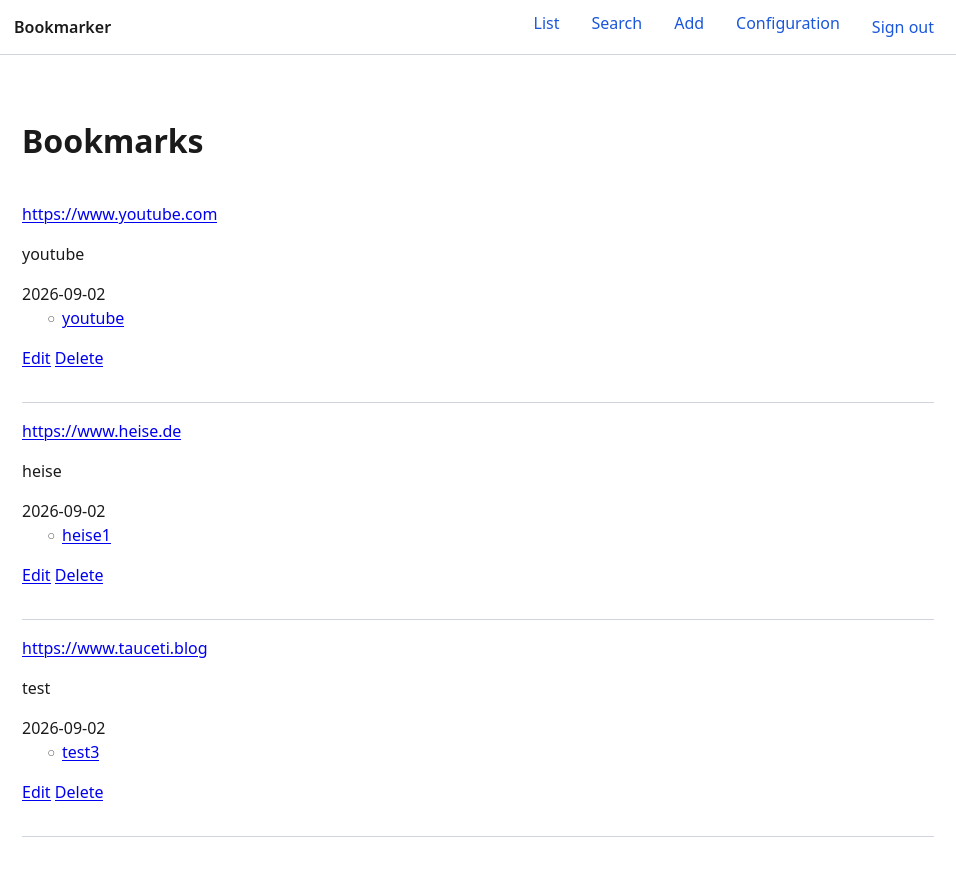
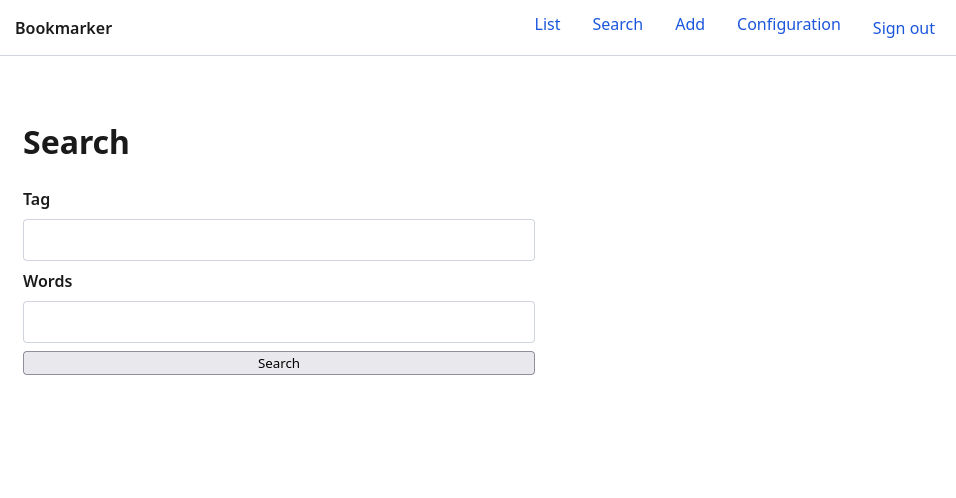
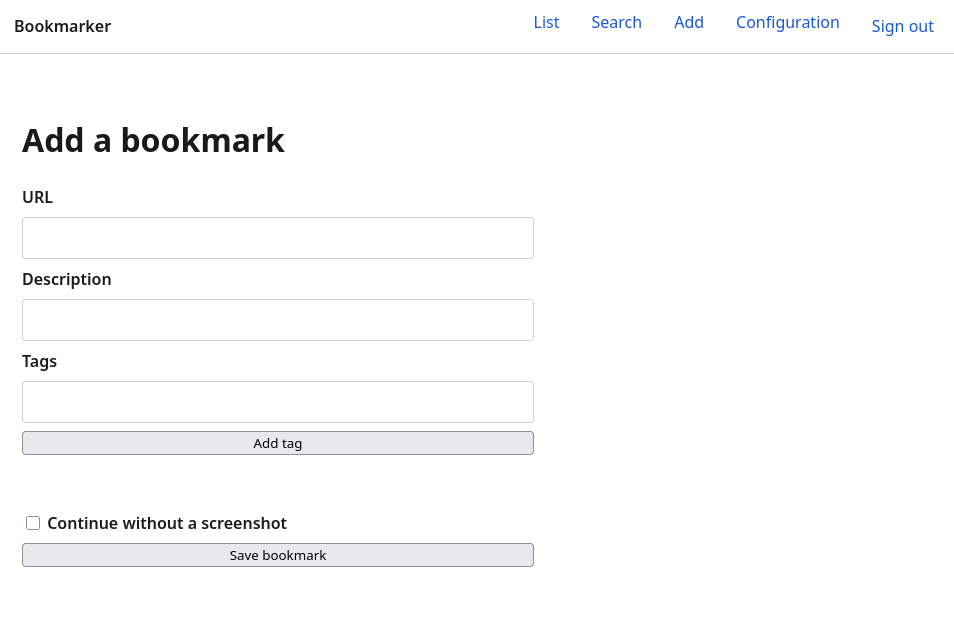
Here are a few screenshots showing how the application finally looks (after logging in and adding some bookmarks).
List
Search
Add
Configuration
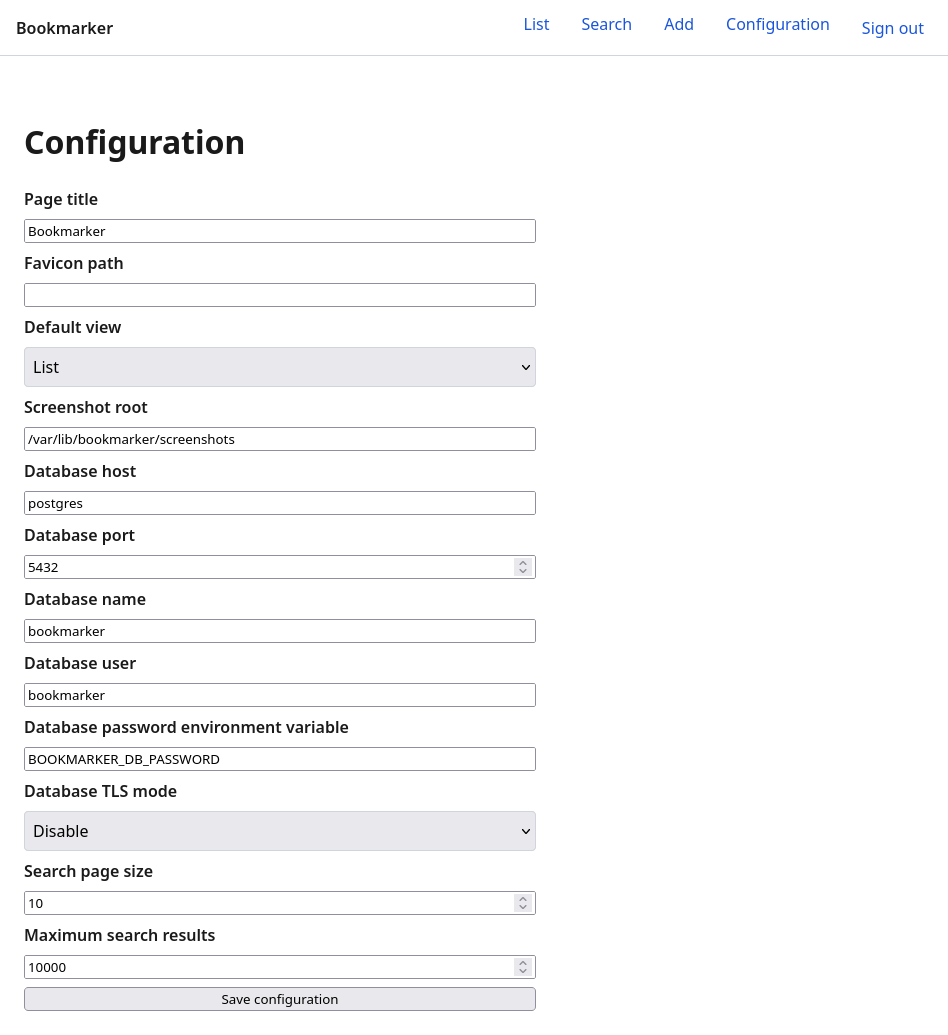
Most of the stuff is indeed working 🎉. But the layout, of course, is not that great. But nobody asked for a nice theme, for example 😉. It also has some bugs that need to be fixed. As mentioned above, I’ll do the fixing in “Agent” mode without any /speckit commands. Only if a bug fix really required a specification change would I start again with /speckit.specify to implement the bug fix as a “feature”.
Regarding bugs and decisions the AI made: while the application generally works, there are a few observations I made:
- Node.js version 22 was used instead of version 24, which was already the latest LTS version a few months before I started the implementation.
- I specified that the main menu should be a burger menu in the upper right. But the agent implemented the menu differently. If you make the browser window smaller, the menu items disappear and a “Menu” button appears. But it doesn’t work when you click on it.
- If you edit a bookmark and then add tags, the old tags get overridden.
There are certainly more bugs, but these are the ones I found during my first round of testing.
Bug fixing
While I fixed a few bugs so far with Agent mode there is now a new possibility. After I wrote this blog post a bug extension was introduces with provides a few /speckit.bug.* commands. It can be installed with this command:
specify extension add bugAs mentioned above I had an issue that the burger menu wasn’t implemented correctly. So I used the following command to fix that (I also pasted a screenshot of the burger menu used in vdradmin-go to give the agent an idea how it should look like - which is quite often very helpful if it comes to UI design):
/speckit.bug.assess Initially I said I want to have a burger menu at the upper right. I've pasted an example from a different application. You can find it in /opt/scripts/vdradmin-go/ directory.And this is what I got back:
The assessment is valid, and no fix report exists yet. I’ll:

- Add failing regression tests for desktop/mobile menu behavior.
- Keep the existing theme and add an upper-right burger dropdown.
- Load behavior from the shared layout and preserve htmx form setup.
- Verify navigation, keyboard handling, authentication, and the no-JavaScript fallback.
- Record the changes and results in the fix report.
Then I started the bug fixing:
/speckit.bug.fix slug=upper-right-burger-menuAnd indeed it now looks like intended:
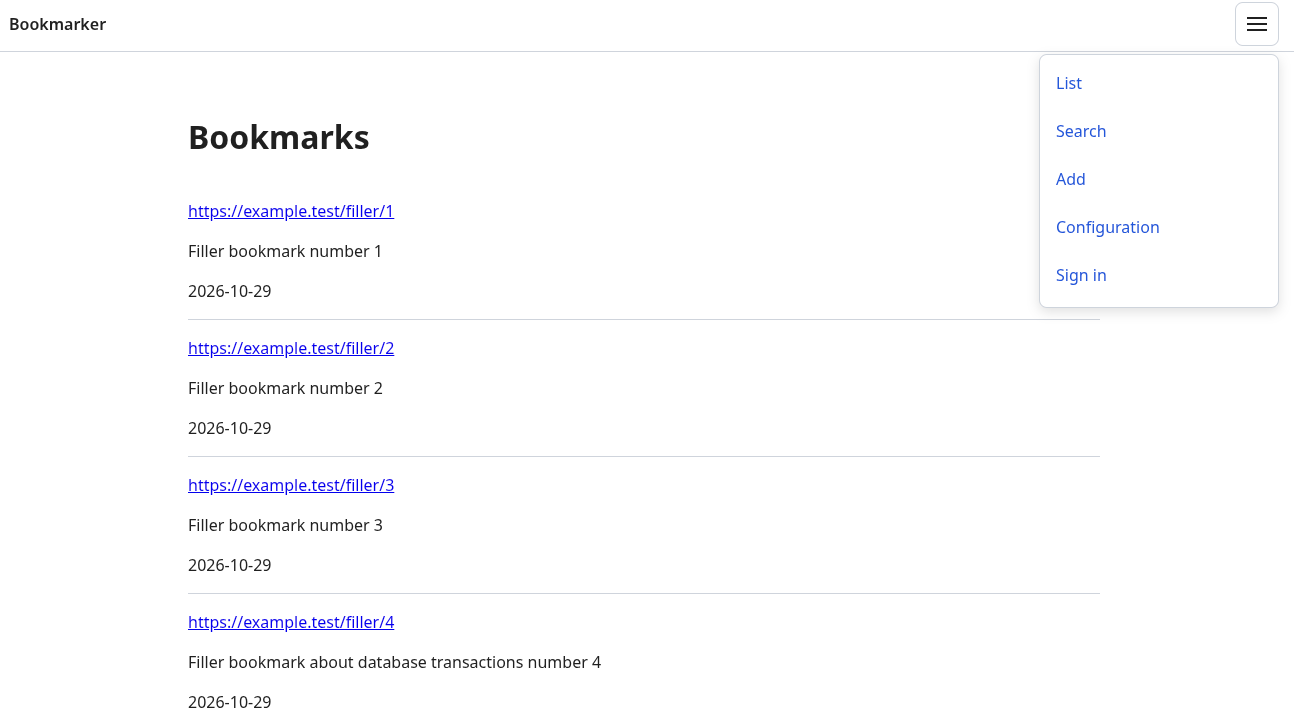
Summary
If you made it this far: congratulations! So, what’s the outcome? It’s a bit hard to say honestly. IMHO - and you most probably already have figured out - using Spec Kit makes the most sense if there is a chance that the project will have (or grow to) a certain size. Just implementing a Python script with a few hundred lines might not justify using it. The initial implementation of la-memoria has:
- 9,763 non-blank lines of code across 127 source files
- 2,360 non-blank lines of documentation across 42 documentation files
- 12,123 non-blank lines total
My previous project vdradmin-go, mentioned above, started as a vibe-coded project (more or less). But there was already Perl code. The AI had at least some idea what my goal was. I also told it to start using modern architecture (hexagonal architecture, or ports & adapters, for maintainability), clean code (following Go best practices and SOLID principles), a modern UI (htmx for dynamic interactions, modern CSS, minimal JavaScript), and a few other goals. So I was not just telling the AI to “do something” but to respect some constraints, best practices, and so on. I also always started in “Plan” mode, which allowed me to clarify and refine the plan before I started the implementation.
The AGENTS.md I added later, when quite some code was already implemented. But it also improved things quite a bit. The agent then did things like writing documentation automatically and also creating docs about what went wrong, why something was implemented this way, and similar topics. So the project improved a lot over time (while I still have no Playwright tests there). Unit tests, integration tests, and Test Driven Development (TDD) in general became super useful when it comes to coding with agents.
At a very high level, I implement new features in vdradmin-go in a way similar to what I did here with Spec Kit. I always start with “Plan” mode, as mentioned. That’s basically /speckit.specify. But while this command generates a few Markdown files, the “Plan” mode stores the outcome only in the agent’s memory by default. Depending on the outcome of the plan, I do further refinements and clarifications. That’s basically /speckit.clarify + /speckit.plan + /speckit.tasks + /speckit.analyze in one, if you do it right. But of course it’s hard to do it in that much detail in “Plan” mode as Spec Kit does. Again, Spec Kit also generates a lot of Markdown files. After “Plan” mode, switching to “Agent” mode finally does the implementation. For Spec Kit, that’s /speckit.implement.
Still, there are quite a few differences, of course. With Spec Kit, you can do everything in much more detail basically out of the box. Everything gets automatically documented. You get user stories and tasks that the agents can implement in parallel by default. If people say that “Plan” mode can basically do the same as Spec Kit, I don’t think that’s entirely true, because with Spec Kit you do things in much more detail than you would in “Plan” mode, in my opinion. And it’s not so easy to forget things.
Don’t get me wrong: you can do a lot in “Plan” mode, but Spec Kit just offers a clear workflow. For example, setting up everything initially with Spec Kit takes much longer than just using “Plan” mode. One thing is that you have to read the generated Markdown files to really benefit later. While reading those files, new ideas might pop up or things you missed to mention.
Also something to think about: this is a project that started from the greenfield. But what about projects that already exist? Especially big ones. Reverse engineering a big project and generating the needed Markdown files accordingly? And who reviews that? But I still think it might make sense to start implementing new features using Spec Kit and work out over time what is important for new features and document it so that it can be consumed by further features with Spec Kit. But I haven’t tested how this really works. I’m thinking of giving it a try with vdradmin-go.
What about the costs? As mentioned, I currently have a GitHub Pro Plus subscription. I did the specifications with GPT-5.6 Sol for the reasons mentioned. The code was then implemented by GPT-5.6 Terra and partly by Claude Sonnet 5. Some simple fixes were done by GPT-5.6 Luna (the cheapest model of the GPT-5.6 models). With that subscription, I currently have 7000 credits per month. The subscription costs nearly $40/month. The whole initial setup (so the specs + code + the docs of the 0.0.1 release) used around 7000 credits. So you can do the math 😉 For a company, that’s nothing. If an engineer without AI needs a week to do this it costs way, way more. For an individual like me, it’s a different story because it’s just a hobby. I assume implementing all the features I have in mind will cost me another 10,000-15,000 credits. If that holds true, even the Copilot Max subscription with its 20,000 credits would not be enough. Still, how long would it take one to implement all of this, especially when you consider the time you would need to invest?
If it comes to costs, “tokens” of course come into play. If you see all the code and docs implemented, you can imagine that Spec Kit will burn more tokens than if you tried to do it without it, because everything is more verbose, you need to generate, clarify and refine the specs, and so on. I’d assume you need 20-30% more tokens just because of using Spec Kit. But honestly, I have no concrete numbers. And it’s a bit hard to compare to vdradmin-go, which developed over a few months. So I never maxed out all the tokens I have available per month (and at that time I only had the 10$ a month subscription of Github Copilot).
But meanwhile, agents are way smarter and they only take into consideration what’s really needed before sending all the text to the AI model. So my impression is that this is not so much of a problem anymore as it was a few months ago, especially if you consider what you get for it.
Also one problem is that the specification lives in the repository. For an individual like me, that’s not a problem. But what if non-technical people should maintain them or discuss them with customers, for example? It’s currently not easy to have the specs somewhere else and sync them back. Maybe some Environment Variables will evolve over time to get more flexibility here.
Overall, I still like Spec Kit, and I guess I’ll stick with it for projects like this. Meanwhile, I really wonder how well the implementation (e.g. the generated code) would have worked and especially how much cheaper it would have been if I had set VS Code to automatic model selection. If it comes to choosing a model, this graph might help: Intelligence Index vs. Cost per Intelligence Index Task. Previously GPT-5.6 Terra (max) was in the “Most attractive quadrant”. Now GPT-6 Astra (low) and GPT-5.6 Sol (high) are there, for example.
The next steps will be to fix the remaining bugs and also introduce a nicer layout. I intend to reuse the themes that were implemented in vdradmin-go.
Happy coding! 😄
Links:
- Spec Kit
- What is Spec-Driven Development?
- Spec-Driven Development Quickstart
- Agentic SDD
- Spec Kit Community Extensions
- Agentic Spec-Driven Development (SDD)
- What is Spec-Driven Development
- Contract-Driven Development
- Spec Kit Core Commands
Spec Kit also releases newsletters every month. As the project is moving forward quite quickly keep an eye on the newsletters.